
Essence Pro‘s (v1.5.1) entry header shows categories, date and author info in the entry meta by default. If you would like to remove all the info other than categories, simply edit Essence Pro’s functions.php, locate the essence_modify_post_info function (around L412) and replace with Before: After:
How to remove Taxonomy Description on WooCommerce Product Tag archives in Genesis
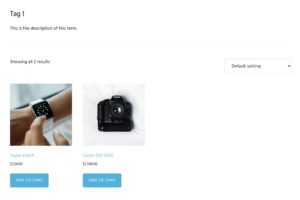
In the Genesis Facebook group a user asks: I have a website with +1000 woocommerce producttags. Each of them has a genesis archive intro text that shows on the website. Is there a way to mass delete or hide this intro text? Looking at /wp-content/themes/genesis/lib/structure/archive.php we can see that genesis_do_archive_headings_intro_text() function is hooked to genesis_archive_title_descriptions […]
How to override add_theme_support from a functionality plugin
Certain Genesis child themes like the Genesis Sample defines some features like the number of footer widget areas in config/theme-supports.php like this: Full code: Generally speaking, child themes are meant to be customized. So if you are looking to change the number of footer widget areas to say 4, it is okay to change the […]
How to change the After Content Featured flexible widget area into a normal widget area in Essence Pro
Widgets placed in After Content Featured widget area when using Essence Pro (tested in v1.5.1) appear in columns or other layouts depending on the number of widgets. The line of code responsible for this is: in Essence Pro’s functions.php (around L538). If you are looking to have the widgets behave “normally” so they stack one […]
Split Navigation in Genesis Sample 3.4.1

This members-only tutorial provides the steps to set up a nav menu having the site logo at the center in Genesis Sample 3.4.1. 960px and above: 959px and below: At smaller viewports we shall set the logo to appear the left with the hamburger menu at the right. Step 1 Upload your logo image at […]
How to add a link to blog page in Front Page 2 widget area of Wellness Pro
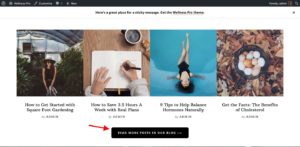
This members-only tutorial provides the steps to add a Read More button that can be linked to the blog below the four widgets in Front Page 2 widget area on Wellness Pro’s homepage. Tested in Wellness Pro 1.1.4 and Genesis 3.3.3. Step 1 Edit /wp-content/themes/wellness-pro/front-page.php. Change genesis_widget_area( ‘front-page-2’, array( ‘before’ => ‘<div id=”front-page-2″ class=”front-page-2″><div class=”flexible-widgets […]
Split Navigation in Genesis Sample

This members-only tutorial provides the steps to display primary navigation menu at the left, title area in the middle and secondary navigation menu at the right in Genesis Sample. Between 960px and 1399px (inclusive) we shall center the site header elements one below the other. 959px and below, it will appear as usual. with the menu expanded Tested in Genesis Sample […]
Adding Social Icons in Essence Pro’s Header
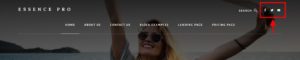
This members-only tutorial provides the steps to register a custom “Next to Search” widget area and position it to the right of search in Essence Pro’s site header. Widgets placed in this widget area like social icons, for example, will then appear in the header. Step 1 Register the next-to-search widget area. In Essence Pro’s […]
How to remove published date from all category archives except for a specific category in Genesis
This premium tutorial provides the code to customize the post info to remove the published date from all category archive pages in Genesis except for a specified category. Add this in child theme’s functions.php: To view the full content, please sign up for the membership. Already a member? Log in below or here.
How to enable responsive hamburger menu for the footer menu in Infinity Pro

A menu appearing in the Footer Menu location in Infinity Pro will appear expanded at all widths out of the box like this: If you want to have this secondary menu collapse into a mobile hamburger menu 800px and below similar to the header (primary) menu simply edit Infinity Pro’s functions.php and change to Users […]
Recent Comments